

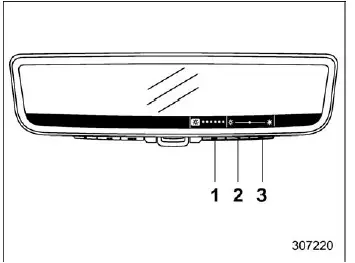
- Setting button: Press the setting button to activate brightness adjustment mode.
- Press this button to decrease the brightness.
- Press this button to increase the brightness.
In the Subaru Ascent, the brightness of the Smart Rearview Mirror display can be precisely adjusted to match ambient lighting conditions. After pressing the setting button, the system switches into vertical adjustment mode, allowing you to fine-tune visibility for both daytime and nighttime driving.
NOTE
If no input is detected within approximately 5 seconds, the Subaru Ascent system will automatically exit the brightness adjustment menu and return to the standard display.
Up/down adjustment
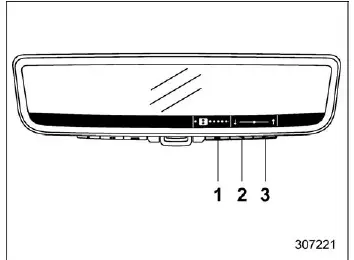
- Setting button: Press the setting button to confirm vertical adjustment.
- Press this button to lower the viewing angle.
- Press this button to raise the viewing angle.
Once activated, the Subaru Ascent allows you to adjust the vertical orientation of the display to better align with your natural line of sight. After completing this step, pressing the setting button again transitions the system to horizontal adjustment mode.
NOTE
If the controls are not used within 5 seconds, the system will automatically exit the up/down adjustment mode.
Left/right adjustment
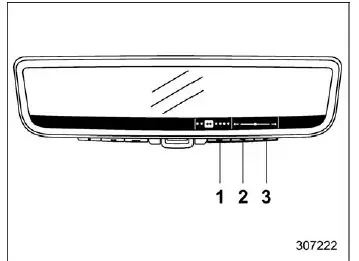
- Setting button: Press the setting button to confirm horizontal adjustment.
- Press this button to move the viewing angle left.
- Press this button to move the viewing angle right.
This stage enables fine horizontal positioning of the Smart Rearview Mirror display in the Subaru Ascent, ensuring optimal alignment and minimizing visual distortion. Pressing the setting button once more advances to the rotation adjustment phase.
NOTE
If no interaction occurs within 5 seconds, the left/right adjustment mode will automatically close.
Rotation adjustment
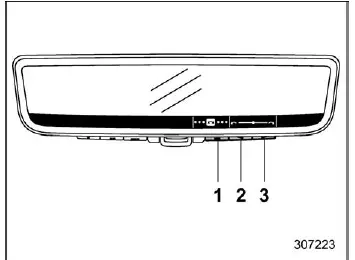
- Setting button: Press the setting button to confirm rotation adjustment.
- Press this button to rotate the display counterclockwise.
- Press this button to rotate the display clockwise.
The Subaru Ascent also allows rotational fine-tuning of the display image, ensuring that the camera feed appears level and correctly oriented regardless of driver position. After completing this step, pressing the setting button transitions the interface to the HomeLink menu.
NOTE
If the controls remain inactive for 5 seconds, the rotation adjustment mode will automatically end and the system will return to its normal display state.
Dimming setting
The Smart Rearview Mirror in the Subaru Ascent includes an automatic dimming feature when operating in mirror mode. When the ignition is in the "ON" position, this function detects light intensity from vehicles behind and automatically reduces glare, enhancing nighttime driving comfort and safety.
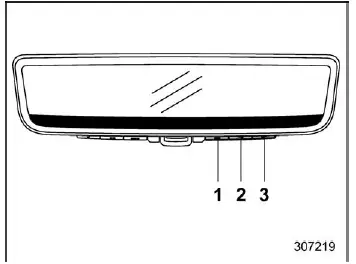
- Left button
- Center button
- Right button
When the Subaru Ascent is set to mirror mode, pressing any of the control buttons will display the dimming configuration menu. Use the center or right buttons to enable or disable the auto-dimming function based on your preference.
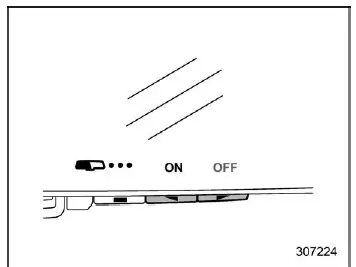
Dimming mirror mode ON indicator
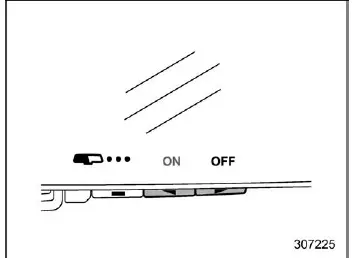
Dimming mirror mode OFF indicator
Each time the dimming function is toggled in the Subaru Ascent, a visual indicator appears for approximately 5 seconds to confirm whether the feature is currently active or inactive.
NOTE
- When the ignition switch of the Subaru Ascent is in the "LOCK"/"OFF" position, the auto-dimming feature will not operate.
- Auto-dimming is also disabled when the system is in display mode, as brightness is managed through screen settings instead.
The Smart Rearview Mirror adjustment system in the Subaru Ascent provides a high level of customization, allowing drivers to precisely configure brightness, angle, and display behavior for maximum clarity and comfort under all driving conditions.
Related manual topics
Snow tires
WARNING
When installing winter tires on the Subaru Ascent, it is absolutely essential
that all four tires are identical in the following characteristics.
Size
Speed rating
Load index
Circumference
Construction type
Manufacturer
Brand and tread pattern
Level of wear
...
Sun visors
The sun visors in the Subaru Ascent are designed to reduce glare from sunlight
and improve driving visibility. Simply lower the visor to block direct sunlight
from the front.
For side protection, swing the visor downward and pivot it toward the side window.
When positioned along the si ...