

CAUTION
When exiting your Subaru Ascent, always ensure that all interior lights are switched off to prevent unnecessary battery discharge and maintain proper vehicle readiness.
Map lights
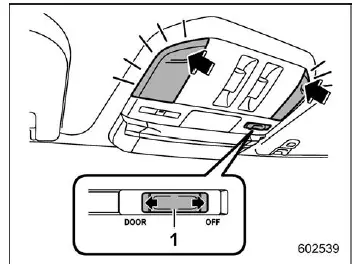
- Door interlock switch
In the Subaru Ascent, the map lights provide convenient illumination for the front seating area. To turn the map light on, gently press the lens. Pressing it again will turn the light off.
Automatic illumination
When the door interlock switch is set to the "DOOR" position, the Subaru Ascent map lights will automatically illuminate under the following conditions:
- When any door (except the rear gate) is opened.
- When the doors are unlocked using the keyless access system or remote keyless entry.
- When the ignition switch is turned from the "ON" or "ACC" position to the "LOCK"/"OFF" position.
Reading light
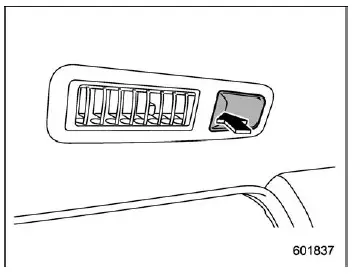
The reading lights in the Subaru Ascent are designed to provide focused lighting for passengers. To switch them on, press the lens. Press again to turn them off.
Automatic illumination
The reading lights in the Subaru Ascent will illuminate automatically in the following situations, regardless of the position of the map light switch:
- When any door (except the rear gate) is opened.
- When the doors are unlocked using the keyless access system (if equipped).
- When the doors are unlocked using the remote keyless entry system.
- When the ignition is switched from "ON" or "ACC" to "LOCK"/"OFF".
Cargo area light
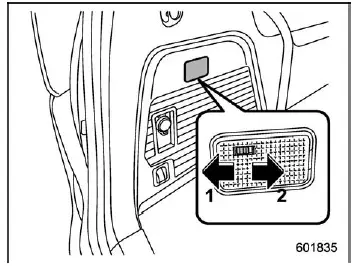
- DOOR
- OFF
In the Subaru Ascent cargo area, the lighting system enhances visibility when loading or unloading items.
DOOR: The light turns on automatically when the rear gate is opened. After closing the rear gate, the light remains illuminated briefly before gradually turning off.
OFF: The light remains completely выключенным regardless of door position.
OFF delay timer
The Subaru Ascent includes a smart delay function for interior lighting, allowing certain lights to remain on briefly after doors are closed.
- Reading light
- Map light
- Cargo area light
When the light switch is set to the "DOOR" position (excluding reading lights), illumination will automatically respond to door locking/unlocking, opening/closing, and ignition status.
NOTE
The duration of the OFF delay timer in the Subaru Ascent can be customized through the center information display or adjusted by a SUBARU dealer for personalized convenience.
One-touch Interior Illumination function
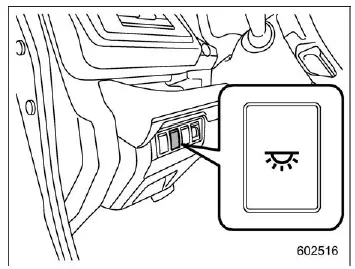
The Subaru Ascent features a convenient one-touch interior lighting function. Press the dedicated switch once to activate both the map lights (when set to "DOOR") and the reading lights simultaneously.
The lights activated by this function will turn off automatically under the following conditions:
- Pressing the one-touch illumination switch again.
- Locking the vehicle using the key fob or transmitter.
- Locking the vehicle via the door handle while carrying the access key (if equipped).
- Locking the rear gate using the power rear gate switch while holding the key fob.
NOTE
- If the interior lights are turned on by another function, the one-touch switch will not override them.
- If the Subaru Ascent battery protection system activates, interior lights will automatically turn off to prevent battery drain.
Related manual topics
Temporary spare tire
WARNING
Never attempt to tow a trailer when the temporary spare tire is installed
on your Subaru Ascent.
The temporary spare tire supplied with the Subaru Ascent is engineered
strictly for short-term emergency mobility and is not capable of handling the
additional load stress creat ...
User recognition function
WARNING
Always complete registration, retrieval, or deletion of seat position and
outside mirror angle settings before starting to drive the Subaru Ascent. Attempting
to adjust or manage these personalized settings while the vehicle is in motion can
distract the driver and significantly incre ...