

NOTE
For the Subaru Ascent remote engine starter transceiver: if the vehicle battery has been replaced, discharged, or disconnected, it is necessary to start the vehicle manually at least once using the key or ignition system before the remote engine start function can be used again. This step allows all Subaru Ascent electronic systems to properly resynchronize and restore full functionality.
Changing the battery
CAUTION
- When replacing the battery in the Subaru Ascent remote engine start transmitter, prevent dust, oil, or moisture from entering the device, as contamination may affect performance.
- Handle the internal circuit board with care to avoid damage during battery replacement.
- Keep batteries and small components out of reach of children, as they may pose a swallowing hazard.
- Always replace the battery with the correct type. Using an incorrect battery may result in overheating or explosion.
- Do not expose the battery to excessive heat sources such as direct sunlight, fire, or other high-temperature environments.
For models with "keyless access with push-button start system": Follow the Subaru Ascent procedure outlined in the section for replacing the access key fob battery to ensure proper operation.
For remote engine starter transceiver: The Subaru Ascent remote start transmitter uses a 3-volt lithium battery (CR-2450). Under normal usage conditions, the battery typically lasts about one year. As the battery weakens, the effective operating range of the transmitter will gradually decrease.
To replace the Subaru Ascent remote transmitter battery, follow these steps carefully.
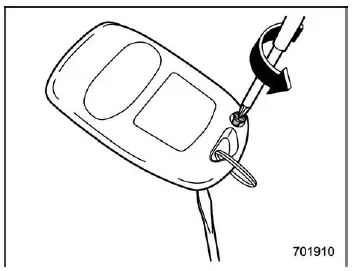
1. Remove the small Phillips screw located on the back side of the transmitter.
2. Using a small flat-head screwdriver, gently separate the two halves of the Subaru Ascent transmitter case.
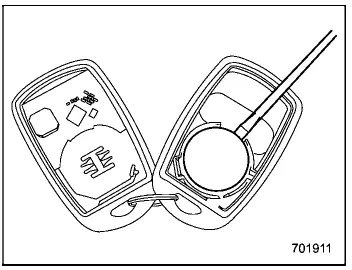
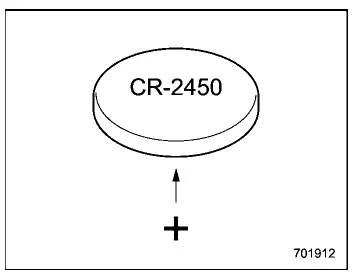
3. Carefully remove the circuit board from the housing and replace the battery with a new one.
Pay close attention to the polarity markings. The positive (+) side of the battery must be oriented correctly, facing away from the circuit board in the Subaru Ascent transmitter.
4. Reassemble the transmitter by snapping the case halves back together, reinstall the screw, and test the Subaru Ascent remote engine start system to confirm proper operation.
Certification for remote engine starter
U.S.-spec. models
CAUTION
FCC WARNING
Changes or modifications not expressly approved by the responsible compliance authority may void the user’s right to operate the Subaru Ascent remote system.
NOTE
This Subaru Ascent device complies with Part 15 of the FCC Rules. Operation is subject to two conditions: (1) it must not cause harmful interference, and (2) it must accept any interference received, including interference that may affect operation.
Related manual topics
Spark plugs
Replacing spark plugs in your Subaru Ascent can be technically challenging due
to limited access and engine layout. For this reason, it is recommended to have
this service performed by a qualified SUBARU dealer.
Spark plugs should be replaced at the intervals specified in the "Warranty and ...
Maintenance precautions
When maintenance or servicing is required for your Subaru Ascent, it is strongly
recommended that all work be performed by an authorized SUBARU dealer. This ensures
that procedures are carried out correctly using approved tools and genuine parts.
If you choose to perform maintenance on your Sub ...