

The Driver Monitoring System, known in some markets as DriverFocus, is an advanced safety and personalization feature integrated into the Subaru Ascent. This intelligent system continuously observes the driver’s behavior to detect signs of distraction or reduced attention, while also identifying individual users for a more tailored driving experience.
Within the Subaru Ascent, this system not only enhances safety by issuing alerts in cases of inattentive or drowsy driving, but also improves everyday comfort by automatically restoring personalized settings for recognized drivers.
Once a driver profile is registered, the Subaru Ascent can instantly recall multiple customized preferences upon entry, allowing for a seamless transition into a familiar driving environment.
- Driver's seat position
- Climate control preferences
- Instrument cluster configuration
- Center information display settings
This integration of safety monitoring and user recognition makes the Subaru Ascent more intuitive and driver-focused, especially in shared vehicle scenarios.
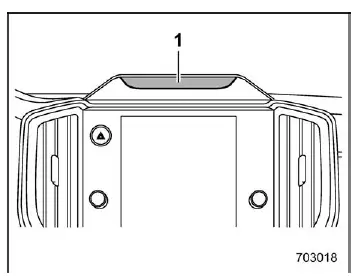
- Camera
CAUTION
- Always remain attentive while driving the Subaru Ascent.
- Relying too heavily on the Driver Monitoring System may create a false sense of security and could lead to serious accidents.
- This system cannot definitively determine whether the driver is drowsy or fully alert.
- It is not capable of evaluating the driver’s physical or mental condition, including fatigue or reduced reaction ability.
- Under certain conditions, detection accuracy may be reduced or temporarily unavailable.
NOTE
- The camera used for user recognition in the Subaru Ascent does not record or store images, audio, or video data.
- The system may not function correctly if strong sunlight interferes
with the camera, especially in the following cases:
- Direct sunlight shining onto the camera lens
- Shadows cast across the driver's face
- Rapid fluctuations in lighting intensity
- Devices emitting infrared light within the cabin may disrupt system performance.
- When wearing glasses or sunglasses, detection accuracy in the Subaru
Ascent may be affected under these conditions:
- Lenses that block infrared light
- Strong reflections on lenses
- Frames obstructing the eyes
- Infrared reflections from LED sources
- Use of accessories such as eyepatches or hats covering the eyes
- Face coverings such as masks, scarves, or sunglasses may prevent accurate recognition of facial features.
- Objects placed between the driver and the camera may block detection of key facial elements.
- Steering wheel covers or accessories may obstruct the camera’s field of view depending on adjustment position.
- Never place stickers or objects on the camera or infrared LED components, as this will impair monitoring performance.
- Hanging items from the interior mirror may interfere with detection in the Subaru Ascent.
- Avoid touching the camera lens directly. If contamination occurs, gently clean it using a soft cloth.
- Scratches or condensation on the camera surface can reduce detection accuracy.
- During user registration, keep your eyes open and face clearly visible to improve recognition quality.
- If recognition performance decreases, delete the profile and re-register the user.
- Drivers who alternate between glasses and contact lenses are advised to register both appearances.
- Recognition begins immediately upon entering the Subaru Ascent, but looking away for extended periods may delay identification.
- Individuals with similar facial features (e.g., twins) may occasionally be misidentified.
- If multiple faces are present near the driver’s seat, the system may not function correctly.
- Looking downward at controls or navigation may be interpreted as inattentiveness.
- Bright light or narrowed eyes may be mistaken for closed eyes, triggering warnings.
- Drowsiness detection is based on eye closure duration and frequency, not subjective fatigue.
- Frequent blinking or prolonged eye closure may activate alerts even if the driver feels alert.
- Leaning forward or out of the window may trigger inattentive driving warnings.
- Warnings are typically suppressed when the vehicle is stationary or moving at low speeds.
- The Subaru Ascent stores facial recognition data locally within the vehicle system. This data is not transmitted externally and remains private. The Driver Monitoring System can be disabled or reset at any time, but doing so will disable its safety and personalization features.
Additional insight: The Driver Monitoring System in the Subaru Ascent is most effective when combined with attentive driving habits. While it enhances awareness and comfort, it should always be treated as a supportive feature rather than a substitute for driver responsibility.
The range of available features in the Subaru Ascent depends on how the Driver Monitoring System and the user recognition function are configured. These settings determine which convenience and safety capabilities are active, allowing the system to adapt to different driver preferences and usage scenarios.
Available functions
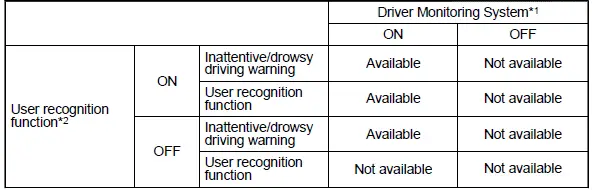
In the Subaru Ascent, the Driver Monitoring System can intelligently manage multiple functions that enhance both safety and personalization. Depending on the selected configuration, the system can actively monitor driver attention and automatically restore previously saved settings for recognized users, creating a more seamless and intuitive driving experience.
Available function items
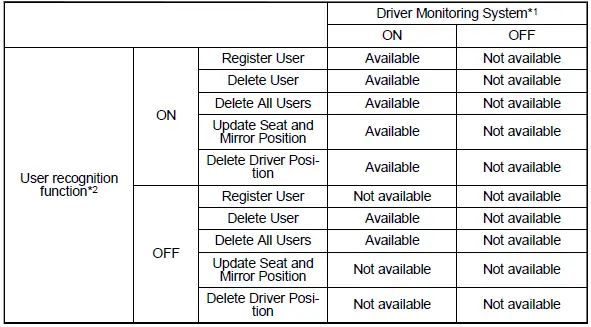
Each available feature in the Subaru Ascent can be individually controlled through the center information display, giving the driver flexibility to enable or disable specific functions according to personal needs or driving conditions. This level of customization ensures that the system remains both practical and user-friendly.
*1: Certain functions in the Subaru Ascent Driver Monitoring System can be switched
ON or OFF directly via the center information display. Refer to "Car settings" for
detailed instructions.
*2: Some features can also be enabled or disabled within the customization menu
of the center information display, allowing further fine-tuning of the system behavior.
Additional note: For optimal performance in the Subaru Ascent, it is recommended to periodically review and adjust Driver Monitoring System settings, especially when multiple drivers use the vehicle, ensuring that each user benefits from accurate recognition and personalized comfort features.
Refer to "Car settings"
In the Subaru Ascent, the availability of Driver Monitoring System features is directly influenced by whether a driver profile has been registered. When no user is stored in the system, only basic monitoring capabilities may be active, while advanced personalization and recognition-based functions remain limited.
Once a user is properly registered in the Subaru Ascent, the system unlocks a broader set of intelligent features, including automatic driver recognition and restoration of personalized settings. This allows the vehicle to instantly adapt to the identified driver, significantly improving comfort, convenience, and overall driving experience.
Available functions

Depending on the registration status, the Subaru Ascent dynamically adjusts which Driver Monitoring System functions are accessible. Registered users benefit from enhanced interaction with the system, while unregistered operation provides a more basic level of monitoring without personalization features.
Additional note: To fully utilize the capabilities of the Subaru Ascent Driver Monitoring System, it is strongly recommended to register individual driver profiles. This ensures more accurate recognition and enables the system to deliver tailored settings and safety alerts optimized for each driver.
- User recognition function
- Driver Monitoring System indicator/warning
- Using the Driver Monitoring System
- Registering and deleting a user
- Driver Monitoring System ON/OFF settings
Related manual topics
Specifications
Specifications
Dimensions
*1: All measurements for the Subaru Ascent are taken with the vehicle in an unloaded
condition, ensuring standardized reference values.
Engine
Fuel ...
Continuously variable transmission
WARNING
Never shift the Subaru Ascent transmission from "P" or "N" into "D" or "R"
while pressing the accelerator pedal. This can cause sudden and uncontrolled vehicle
movement.
CAUTION
Follow these precautions when operating the Subaru Ascent transm ...