

NOTE
- The high beam assist function in the Subaru Ascent operates using a stereo camera mounted near the front map light area, allowing the system to continuously monitor road conditions ahead.
- For proper handling and maintenance of the stereo camera system, refer to the Owner’s Manual supplement for the EyeSight system installed in the Subaru Ascent.
The high beam assist function in the Subaru Ascent is an intelligent lighting feature that automatically switches between high beam and low beam headlights. This system is designed to optimize nighttime visibility while reducing glare for other road users, improving both safety and driving comfort.
When the Subaru Ascent detects favorable driving conditions, it will automatically activate the high beam headlights. This occurs only when all of the following requirements are met:
- The vehicle speed reaches or exceeds approximately 20 mph (32 km/h).
- No vehicles are detected ahead or approaching from the opposite direction.
- The road ahead is sufficiently dark.
- The road does not include sharp or tight curves that could affect visibility.
Conversely, the Subaru Ascent will automatically switch the headlights back to low beam when any of the following conditions are detected:
- The vehicle speed drops to around 10 mph (16 km/h) or lower.
- The forward area becomes well illuminated.
- A preceding or oncoming vehicle is detected by the system.
- The EyeSight system experiences a malfunction or is temporarily unavailable.
NOTE
- Although the high beam assist system in the Subaru Ascent is highly advanced, it should not be relied upon exclusively. The driver remains responsible for monitoring surroundings and manually adjusting the headlights when necessary.
- The function is enabled by default from the factory. However, it can be deactivated if required by contacting an authorized SUBARU dealer for configuration.
How to use the high beam assist function
To activate the high beam assist function in the Subaru Ascent, the following conditions must be satisfied:
- The light control switch is set to the "AUTO" position, allowing automatic low beam activation.
- The turn signal lever is pushed forward into the high beam position.
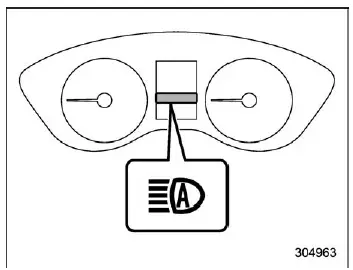
High beam assist indicator light
Once the high beam assist function is active, the corresponding indicator light will illuminate on the Subaru Ascent combination meter, confirming that the system is operating.
NOTE
If the system detects a malfunction or is temporarily disabled, the headlights will remain in low beam mode to ensure safe operation.
How to temporarily lower the sensitivity of the high beam assist function
The sensitivity of the high beam assist system in the Subaru Ascent can be reduced if needed by performing the following steps:
1. Before turning the ignition switch to the "ON" position, set the light control switch to "AUTO" and push the turn signal lever forward to the high beam position.
2. Turn the ignition switch to the "ON" position, and within approximately 15
seconds, press the
 switch (following distance setting) more than 10 times in quick succession.
The Subaru Ascent high beam assist system is engineered to balance maximum road visibility with consideration for other drivers, automatically adapting lighting conditions while allowing manual override whenever needed.
When the sensitivity of the high beam assist function in the Subaru Ascent is
reduced, the high beam assist indicator light "
 "
on the combination meter will flash, clearly informing the driver that the system
is operating with adjusted sensitivity.
"
on the combination meter will flash, clearly informing the driver that the system
is operating with adjusted sensitivity.
NOTE
- The sensitivity of the high beam assist system in the Subaru Ascent
cannot be lowered under certain operating conditions:
- When the Cruise Control indicator is illuminated.
- When the EyeSight warning indicator (yellow) is active.
- Any changes to the sensitivity level are temporary. The system will automatically return to its default sensitivity the next time the Subaru Ascent ignition is switched to the "LOCK"/"OFF" position and the engine is restarted.
How to change the headlight mode manually
Change to the low beam: To manually deactivate the high beam assist function in the Subaru Ascent and return to low beam headlights, simply move the turn signal lever back to its neutral (center) position. This action will turn off the system and extinguish the high beam assist indicator light.
Change to the high beam: To switch to high beam manually, rotate
the light control switch to the "
 "
position. This overrides the automatic function and forces the headlights into high
beam mode.
"
position. This overrides the automatic function and forces the headlights into high
beam mode.
At this point, the high beam assist system in the Subaru Ascent will be deactivated, the assist indicator will turn off, and the standard high beam indicator light will illuminate on the combination meter.
NOTE
- If you wish to reactivate the high beam assist function after manually switching to high beam, return the light control switch to the "AUTO" position.
- When manually activating high beams in the Subaru Ascent, switching
the light control to the "
 "
position will also turn on additional exterior lights, including instrument
panel illumination, parking lights, side marker lights, tail lights, and license
plate lighting.
"
position will also turn on additional exterior lights, including instrument
panel illumination, parking lights, side marker lights, tail lights, and license
plate lighting.
Tips for the high beam assist system
- The Subaru Ascent high beam assist function determines lighting conditions
based on the brightness detected ahead of the vehicle. As a result, automatic
switching may occasionally occur in situations that do not fully align with
the driver’s expectations.
For this reason, drivers should remain attentive and be prepared to adjust the lighting mode manually if needed.
- Smaller road users such as bicycles or cargo cycles may not always be detected accurately by the system.
- In certain environments, the Subaru Ascent may not correctly interpret ambient
lighting conditions, which can affect system performance. This may result in
high beams remaining on when they should dim, or low beams remaining active
when high beams would be more appropriate. In such cases, manual adjustment
is recommended.
- Adverse weather conditions such as fog, snow, heavy rain, or dust storms.
- When the windshield is dirty, fogged, or partially obstructed, reducing the effectiveness of the stereo camera.
The Subaru Ascent lighting assistance technology is designed to support the driver with intelligent automation, but optimal performance is achieved when combined with attentive driving and timely manual control when conditions require it.
- When the windshield of the Subaru Ascent is dirty, fogged, or covered with moisture, reducing the ability of the stereo camera to correctly detect surrounding light conditions.
- When the windshield is cracked, chipped, or otherwise damaged, which may distort the camera’s field of view.
- When the stereo camera unit in the Subaru Ascent is deformed or its lenses are contaminated with dirt, dust, or debris.
- If there are external light sources in the surrounding environment that resemble headlights or tail lights, potentially confusing the system.
- When an oncoming vehicle or a vehicle ahead is traveling without properly activated headlights or tail lights.
- If the headlights of an approaching vehicle or the tail lights of a vehicle ahead are dirty, faded, discolored, or incorrectly aligned.
- When there are rapid or frequent changes in brightness while driving, such as passing through alternating light and dark areas.
- When driving the Subaru Ascent on uneven roads with frequent elevation changes, hills, or dips.
- When traveling on roads with numerous sharp curves or winding sections.
- When highly reflective objects, such as road signs, mirrors, or metallic surfaces on nearby vehicles, reflect strong light toward the camera.
- When the rear section of a vehicle ahead, such as a cargo container, reflects a significant amount of light.
- When the headlights of the Subaru Ascent itself are dirty, damaged, or misaligned.
- When the Subaru Ascent is tilted due to uneven load distribution, a flat tire, or while being towed.
- Immediately after the engine is started, when system calibration may still be stabilizing.
- When your vehicle encounters an oncoming vehicle suddenly while navigating a blind curve.
- When another vehicle crosses directly in front of your Subaru Ascent.
- When vehicles ahead or oncoming traffic intermittently disappear from view due to curves, road barriers, trees, or other obstructions.
- The brightness and color characteristics of headlights from oncoming vehicles or tail lights from vehicles ahead.
- Headlights or tail lights that are partially obscured by mud, snow, or other contaminants.
- The movement, speed, and direction of surrounding vehicles.
- Situations where only one headlight or tail light is visible due to angle or obstruction.
- When nearby vehicles are motorcycles, which present a smaller light profile.
- Road conditions, including gradients, curves, and surface irregularities.
- The number of passengers and the weight of cargo, which may affect vehicle angle and sensor alignment.
- Intrinsic limitations of the stereo camera detection system used in the Subaru Ascent.
The Subaru Ascent high beam assist system is a sophisticated support feature, but its performance depends heavily on environmental conditions and sensor visibility, making driver awareness and manual intervention essential when needed.
Related manual topics
Engine compartment overview
Brake fluid reservoir
Fuse box
Windshield washer tank
Battery
Engine oil filler cap
Radiator cap
Engine coolant reservoir
Engine oil filter
Engine oil level gauge
Air cleaner case
The engine compartment of your Subaru Ascent is carefully organized to allow
easy acc ...
Reverse Automatic Braking (RAB) system
The Reverse Automatic Braking (RAB) system in the Subaru Ascent is an advanced
safety feature developed to help minimize the risk of collisions when reversing.
By continuously monitoring the area behind the vehicle, the Subaru Ascent can detect
obstacles such as walls or stationary objects and ...