

Airflow mode selection
In the Subaru Ascent, airflow direction can be customized manually to suit different driving conditions and passenger comfort preferences. To select the desired airflow mode, follow the steps below.
1. Tap the climate control mode indicator on the display.
2. Choose the preferred airflow distribution mode from the available options.
The Subaru Ascent offers multiple airflow configurations to optimize comfort and visibility.
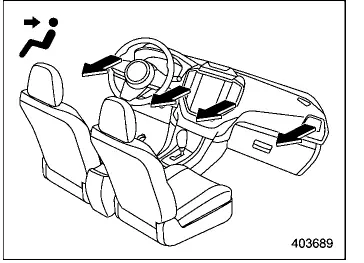
Ventilation: Air is directed primarily through the instrument panel outlets, providing direct airflow to the upper body.
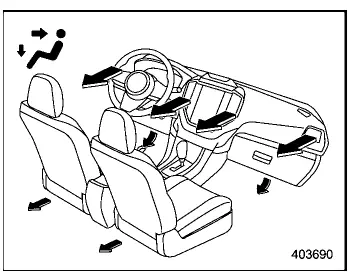
Ventilation 2: Air is distributed between the instrument panel outlets and foot outlets, offering a balanced airflow pattern.
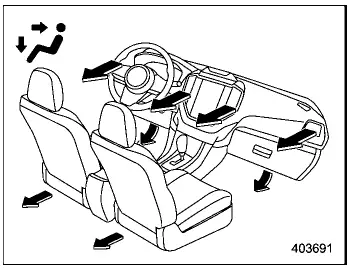
Bi-level: A combination mode where air flows simultaneously to the upper vents and lower foot area, improving overall cabin comfort.
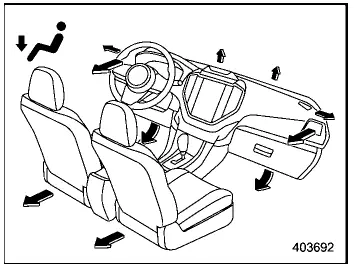
Heat: Air is directed mainly to the foot outlets, with a portion routed toward the windshield and side windows to help prevent fogging.
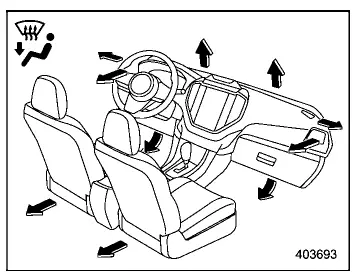
Heat-def: Air is directed to the windshield defroster outlets, foot outlets, and side vents, ensuring both cabin warmth and clear visibility.
Temperature control
In the Subaru Ascent, temperature can be adjusted either through physical buttons or the touchscreen interface, allowing precise control of cabin conditions.
Temperature control buttons: Press the blue side to decrease temperature (cooling) or the red side to increase temperature (heating).
Temperature control screen:
1. Touch the climate control mode indicator to open the temperature interface.
2. Adjust the temperature using one of the following methods:
- Slide your finger along the temperature control bar
- Tap "
 "/"
"/"
 "
" - Select the desired value directly on the temperature scale
Max A/C mode
For rapid cooling inside the Subaru Ascent, activate MAX A/C mode by selecting it from the climate control mode icon or customizable shortcut.
When enabled, the Subaru Ascent automatically adjusts several parameters for maximum cooling performance:
- The air conditioning system turns on immediately
- The temperature is set to the lowest possible level
- The fan speed increases to maximum output
- The air inlet switches to recirculation mode for faster cooling
- The airflow is directed through the front ventilation outlets
To exit MAX A/C mode and restore previous settings, simply tap "MAX A/C" again.
SYNC mode
- When SYNC mode is activated in the Subaru Ascent, the climate settings for
the front passenger and rear passengers (if rear climate control is active)
are automatically aligned with the driver’s settings. This includes:
- Temperature synchronization for all zones
- Airflow mode adjustment for rear passengers
- Fan speed coordination for rear climate system
- If the SYNC icon is displayed, tap it to enable or disable synchronization.
- If another function is shown instead, access the climate control menu and select SYNC manually.
When SYNC mode is active in the Subaru Ascent, the SYNC indicators (including rear SYNC when applicable) will illuminate, confirming synchronized operation.
To deactivate SYNC mode, tap the SYNC icon again or manually adjust the front passenger temperature. Adjusting rear climate settings will cancel synchronization only for the rear system.
Fan speed control
To adjust airflow intensity in the Subaru Ascent, select the desired fan speed using the touchscreen controls.
Select the preferred fan speed by touching
 or
or
 on the climate control display.
The manual climate control system in the Subaru Ascent provides precise customization, allowing drivers to fine-tune airflow, temperature, and fan speed to match personal comfort preferences and changing driving conditions.
Air conditioner control
In the Subaru Ascent, the air conditioning system functions only when the engine is running, ensuring stable performance and proper cooling efficiency.
To activate the air conditioner, make sure the fan is already operating, then proceed with the following steps.
- If the "A/C" icon is visible on the customizable shortcut area, simply tap "A/C". Once activated, the indicator will illuminate, and the A/C symbol will appear on the climate control mode indicator of the Subaru Ascent.
- If another function is displayed instead of "A/C", first open the climate
control menu by tapping the mode indicator, then select "A/C" from the available
options.
After activation, the A/C indicator will light up, confirming that the Subaru Ascent cooling system is operating.
To deactivate the air conditioner in the Subaru Ascent, tap "A/C" again. The indicator light will turn off, signaling that the system is no longer cooling.
NOTE
For improved defogging and humidity control, especially in colder weather, it is recommended to activate the air conditioner even when cooling is not required. However, when the outside temperature approaches approximately 32°F (0°C), the A/C system and dehumidification function may not operate effectively.
Air inlet selection
In the Subaru Ascent, you can control whether fresh air is drawn from outside or recirculated within the cabin by selecting the appropriate air inlet mode via the climate control interface.
Recirculation mode: In this mode, interior air is continuously circulated within the Subaru Ascent cabin. This setting is particularly useful in the following situations:
- Driving on dusty or polluted roads
- Maximizing cooling performance during hot weather conditions
To activate recirculation mode:
-
 is displayed on the customizable icon:
(1) Tap .
. -
 is not displayed on the customizable icon:
(1) Open the climate control menu.
(2) Select the recirculation option from the air inlet controls.
 will appear on the climate control mode indicator, confirming that recirculation
mode is active.
will appear on the climate control mode indicator, confirming that recirculation
mode is active.
Outside air circulation mode: This mode allows fresh air from outside to enter the Subaru Ascent cabin, improving ventilation and air quality.
It is recommended to use this mode in the following cases:
- After leaving dusty or polluted environments
- When the cabin temperature has reached a comfortable level
Switching back to outside air mode follows the same procedure as activating recirculation
mode. When selected,
 will appear on the climate display.
WARNING
Extended use of recirculation mode in the Subaru Ascent may cause window fogging and reduce visibility.
Always switch back to outside air mode once external conditions improve to maintain proper airflow and clear windows.
NOTE
When outside air mode is selected in the Subaru Ascent, the system may automatically adjust airflow settings based on cabin temperature, selected temperature, and environmental conditions.
To turn off the front climate control system
To switch off the front climate control system in the Subaru Ascent, tap the "ON/OFF" button on the climate control display.
Related manual topics
Maintenance schedule
U.S. models
For Subaru Ascent vehicles intended for the U.S. market, all required maintenance
procedures and service intervals are подробно outlined in the "Warranty and Maintenance
Booklet". To ensure proper care and long-term reliability of your Subaru Ascent,
always consult this ...
Continuously variable transmission
WARNING
Never shift the Subaru Ascent transmission from "P" or "N" into "D" or "R"
while pressing the accelerator pedal. This can cause sudden and uncontrolled vehicle
movement.
CAUTION
Follow these precautions when operating the Subaru Ascent transm ...