

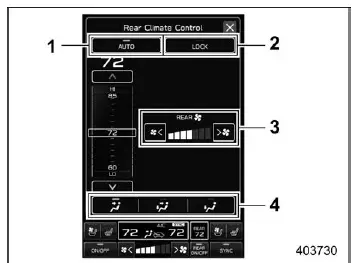
Rear climate control screen
- Rear climate control auto mode icon
- Rear climate control panel lock icon (if equipped)
- Fan speed
- Airflow mode
The Subaru Ascent provides convenient rear climate management through the central display, allowing rear passengers to enjoy a comfortable environment tailored to their needs.
To activate automatic rear climate control in the Subaru Ascent:
1. Touch the rear climate control mode indicator on the display.
2. Select "AUTO" mode.
3. Adjust the desired temperature for the rear cabin area.
NOTE
If the lock icon is displayed on the rear climate control indicator, rear passengers will not be able to adjust settings using the rear panel. This ensures that the driver maintains full control over the climate system.
Rear climate control panel
For Subaru Ascent models equipped with a dedicated rear control panel, passengers can also operate climate settings independently from the rear seating area.
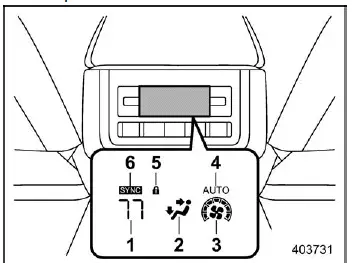
Display of the rear climate control panel
- Set temperature indicator
- Airflow mode indicator
- Fan speed indicator
- AUTO indicator
- Rear climate control lock indicator
- SYNC indicator
To enable AUTO mode from the rear control panel in the Subaru Ascent:
1. Press the "AUTO" button.
2. Set the desired temperature using the controls.
NOTE
If the rear climate system is locked via the central display, a lock icon will appear on both the main screen and rear panel. When this indicator is active, the rear panel controls are disabled. To restore functionality, unlock the system through the vehicle settings menu.
Sensors
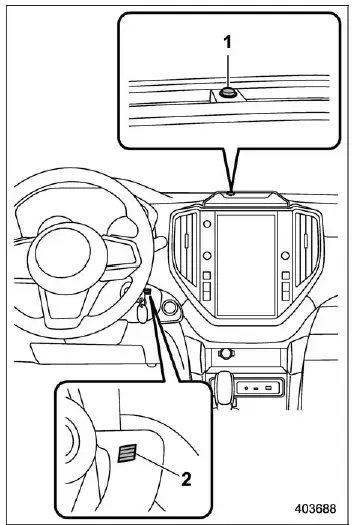
- Solar sensor
- Interior air temperature sensor
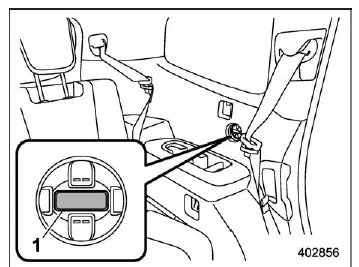
- Rear interior air temperature sensor
The Subaru Ascent automatic climate system relies on multiple sensors to accurately regulate cabin conditions. These include solar sensors that detect sunlight intensity and temperature sensors that monitor interior air conditions.
Because these components are sensitive, proper care is essential to maintain optimal system performance in the Subaru Ascent.
- Avoid striking or applying pressure to the sensors
- Keep sensors dry and free from moisture
- Do not cover or obstruct sensor areas
- Do not touch the rear interior temperature sensor directly
The advanced climate control system in the Subaru Ascent uses intelligent automation and precise sensor data to maintain a comfortable interior environment, adapting seamlessly to changing weather conditions and passenger preferences.
Related manual topics
System maintenance
NOTE
For the Subaru Ascent remote engine starter transceiver: if the vehicle battery
has been replaced, discharged, or disconnected, it is necessary to start the vehicle
manually at least once using the key or ignition system before the remote engine
start function can be used again. This ste ...
How to cancel Surround View Monitor
In the Subaru Ascent, the Surround View Monitor can be deactivated in several
intuitive ways, depending on driving conditions and driver preference.
Manual cancellation
You can manually exit the Surround View Monitor display in the Subaru Ascent
using any of the following actions.
Press th ...