

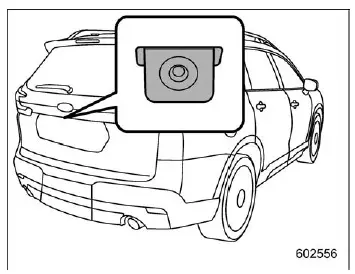
In the Subaru Ascent, the rear view camera is mounted on the rear gate and is designed to assist the driver during reversing maneuvers. When the ignition is switched to the "ON" position and the select lever is moved into "R", the system automatically activates and displays a live rear image on the center information display, helping the driver better monitor the area behind the Subaru Ascent.
WARNING
- Because the Subaru Ascent rear view camera uses a wide-angle lens, the displayed image may appear distorted, and distances may not accurately reflect real-world conditions.
- The visible area shown on the display is limited. Always check the surroundings directly using mirrors and by looking over your shoulder, and reverse slowly. Relying only on the camera image in the Subaru Ascent may result in an accident.
- Do not attempt to disassemble or modify the camera, wiring, or related components. If smoke, unusual запах, or abnormal behavior is noticed, stop using the system immediately and contact a SUBARU dealer. Continued operation may lead to fire, electric shock, or serious damage.
CAUTION
- When cleaning the Subaru Ascent, avoid directing high-pressure water directly at the camera. Moisture entering the camera housing may cause condensation, malfunction, or electrical issues.
- The rear view camera is a precision device. Do not subject it to strong impacts, as this may affect alignment or cause failure.
- If mud, snow, or ice accumulates on the camera lens, remove it carefully.
Use water or lukewarm water to loosen debris, then gently wipe the lens with a soft, dry cloth. Improper cleaning may damage the Subaru Ascent camera and lead to malfunction.
- Keep open flames away from the camera and its wiring to prevent damage or fire hazards.
- When replacing fuses related to the Subaru Ascent camera system, always use fuses with the specified rating. Incorrect fuses may cause system failure.
- Prolonged use of the rear view camera while the engine is off may discharge the vehicle battery.
NOTE
- Do not clean the Subaru Ascent camera lens with alcohol, бензин, or paint thinner, as this may cause discoloration or damage. Instead, use a cloth lightly moistened with diluted neutral detergent, followed by a soft dry cloth.
- When waxing the Subaru Ascent, avoid applying wax directly to the camera. If wax contacts the lens, remove it promptly using a suitable cleaning solution.
- The camera lens is coated for scratch resistance, but it can still be damaged by improper cleaning. Do not use brushes or abrasive materials on the lens surface.
- Bright light sources may create vertical streaks or glare on the display. This is a normal characteristic and not a malfunction of the Subaru Ascent system.
- Under fluorescent or artificial lighting, slight flickering may be visible on the display.
- The color of objects on the Subaru Ascent screen may differ slightly from their actual appearance.
- If the center information display experiences issues, refer to the relevant troubleshooting section for guidance.
How to use the rear view camera
In the Subaru Ascent, the rear view camera activates automatically when shifting into reverse, providing a clear image of the area behind the vehicle. When shifting out of reverse, the display may continue showing the previous image briefly depending on system settings.
1. Turn the ignition switch to the "ON" position.
2. Move the select lever to the "R" position to activate the camera.
NOTE
- The image displayed by the Subaru Ascent rear view camera is horizontally reversed, similar to what is seen in the rearview and side mirrors.
- If the "Rear Camera Delay Control" function is enabled, the rear image will remain on the display for a short time after shifting out of reverse. This setting can be adjusted in the system menu.
- Visibility of the Subaru Ascent camera image may be reduced under certain
conditions, including:
- Driving in dark environments such as at night or inside tunnels.
- Operating in extremely high or low temperatures.
- Presence of water droplets, snow, dirt, or debris on the lens.
- Direct exposure to strong light sources, which may cause glare or vertical lines on the display.
The Subaru Ascent rear view camera enhances reversing safety and convenience, but it should always be used in combination with attentive driving and direct observation of the surroundings.
Viewing range on the screen
CAUTION
The visible area provided by the rear view camera in the Subaru Ascent is limited.
Always confirm the surroundings visually when reversing the Subaru Ascent and proceed carefully at low speed. Relying only on the screen image may result in accidents or injury.
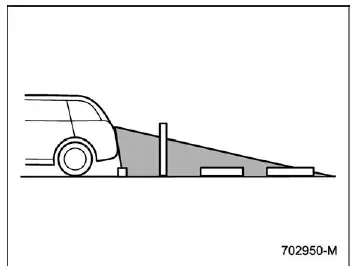
Range of view
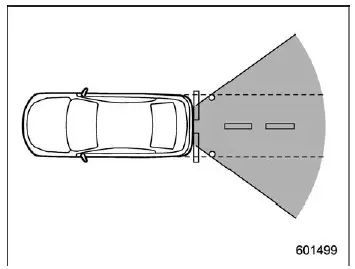
Range of view
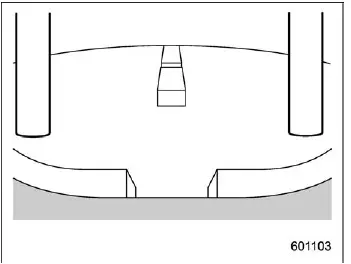
Image from camera
In the Subaru Ascent, the rear view camera allows the driver to see the area extending from the rear bumper outward. However, certain zones remain outside the camera’s field of view, including areas immediately below the bumper and sections near the edges of the vehicle.
Additionally, due to the wide-angle lens used in the Subaru Ascent camera system, objects on the display may appear closer or farther than they actually are, and the perceived length behind the vehicle may seem compressed compared to real-world distance.
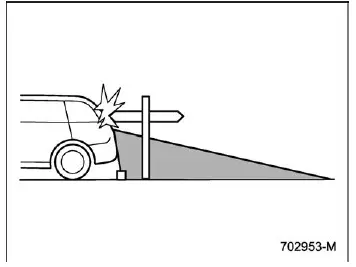
Range of view
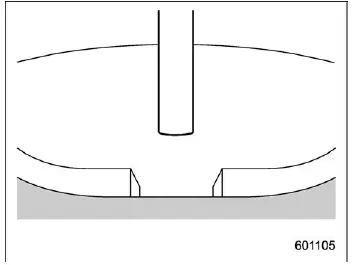
Image from camera
The Subaru Ascent rear view camera cannot capture objects positioned above its mounting point. For example, tall objects such as poles or structures with overhanging sections may not be fully visible on the screen, even if they are directly behind the vehicle.
Help lines
The Subaru Ascent display includes guidance lines that assist the driver in estimating distance and vehicle position relative to surrounding objects. These help lines are intended as visual aids to improve parking accuracy.
NOTE
If the Subaru Ascent is shifted into "R" immediately after turning the ignition on, the warning message may not appear. Wait a few seconds after starting the vehicle before selecting reverse to ensure the system initializes properly.
Once initialized, the warning message will display as expected.
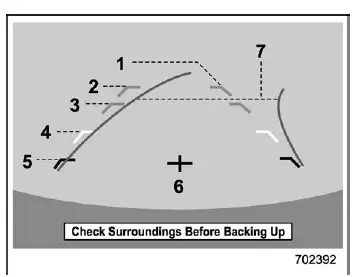
Help lines
- Vehicle width line (oblique vertical line)
- Approx. 10 ft (3 m) from the bumper (green horizontal line)
- Approx. 6 ft (2 m) from the bumper (green horizontal line)
- Approx. 3 ft (1 m) from the bumper (yellow horizontal line)
- Approx. 1.5 ft (0.5 m) from the bumper (red horizontal line)
- Vehicle centerline
- Dynamic guidelines
When the Subaru Ascent is placed in reverse, these help lines are displayed together with the camera image, assisting the driver in aligning the vehicle during maneuvering.
CAUTION
- When reversing the Subaru Ascent, always check behind the vehicle directly
and do not depend solely on the help lines.
Improper reliance on visual guides may result in collisions or injuries.
- The position indicated by the help lines may differ from actual object positions.
- Variations may occur depending on passenger load or cargo weight in the Subaru Ascent.
- On inclined or uneven surfaces, the displayed guidance lines may not accurately reflect real distances or positions.
NOTE
If the "Steering Angle Lines" feature is disabled in the Subaru Ascent settings, the dynamic guidelines will not appear on the display. This function can be adjusted in the system settings menu.
Difference between screen image and actual road
The Subaru Ascent distance markers are calibrated for flat surfaces when the vehicle is unloaded. Actual distances may vary depending on terrain and load conditions.
When there is an upward slope at the back
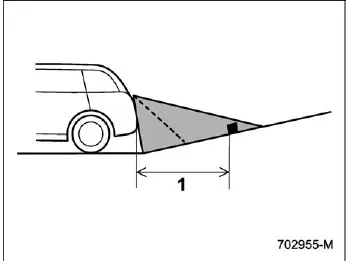
- 3 ft (1 m)
On an uphill surface, the Subaru Ascent display may make objects appear farther away than they truly are, increasing the risk of misjudging distance.
When there is a downward slope at the back
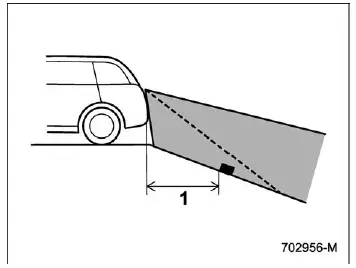
- 3 ft (1 m)
On a downhill surface, the Subaru Ascent display may make objects appear closer than they actually are, which may lead to overly cautious or incorrect maneuvering.
NOTE
When the Subaru Ascent is loaded with cargo, the rear camera image may behave similarly to an uphill condition, making distances appear longer than in reality.
Feature of distance marker
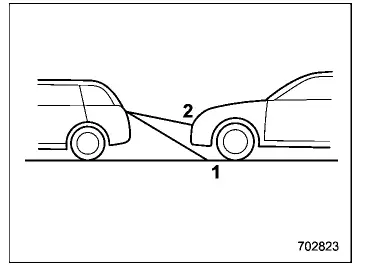
- 3 ft (1 m) line
- 10 ft (3 m) line
The Subaru Ascent distance markers provide a reference for estimating space behind the vehicle. However, if another object or vehicle is positioned very close, the system may not accurately display the true distance.
The Subaru Ascent rear view camera system enhances reversing awareness and precision, but it should always be used in combination with careful observation and safe driving practices to ensure maximum safety.
Related manual topics
Catalytic converter
The catalytic converter in the Subaru Ascent is a critical component of the exhaust
system, designed to reduce harmful emissions such as hydrocarbons (HC), carbon monoxide
(CO), and nitrogen oxides (NOx), thereby helping to protect the environment.
To maintain proper function and avoid cost ...
Overhead console
In the Subaru Ascent, the overhead console provides a convenient storage area
located above the front seats. To open it, gently press upward on the lid at the
"PUSH" marking, and the compartment will automatically release and open smoothly.
WARNING
Do not operate the overhead con ...