

1. Touch
 (HOME) to open the main menu of the Subaru Ascent system interface.
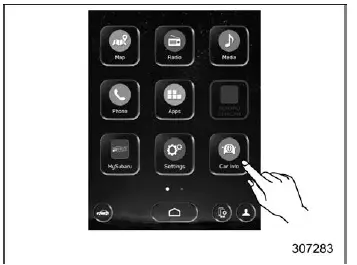
2.
 (Car Info)
Driving Statistics screen
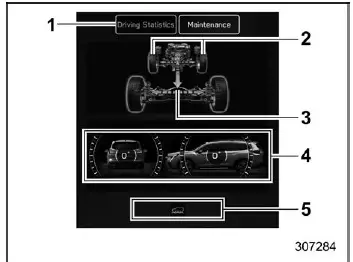
- Driving Statistics
- Steering angle
- Running condition
- Vehicle posture
- Telltale screen
The Driving Statistics screen in the Subaru Ascent provides detailed insight into vehicle behavior and operational status. It displays real-time data related to driving dynamics, allowing the driver to better understand how the vehicle responds under various conditions.
Active systems and functions are visually indicated through illuminated or flashing indicators, helping the driver quickly identify which systems are currently engaged.
NOTE
- The vehicle posture indication in the Subaru Ascent may not always perfectly reflect the actual physical angle of the vehicle.
- When X-MODE is activated, the center information display automatically switches to the dedicated X-MODE screen.
- Vehicle tilt readings can be influenced not only by road conditions but also by passenger load, cargo weight, and acceleration or braking forces.
Maintenance screen
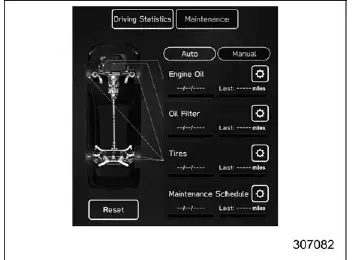
The Subaru Ascent maintenance screen allows drivers to configure and manage service reminders, helping ensure timely vehicle maintenance and optimal performance.
Engine Oil change reminder:
1. Select "Maintenance" from the second menu within the Car Info screen.
2.
 (Engine Oil).
3. Choose either "Notification Date" or "Notification Distance" based on your preferred reminder method.
4.
 "Set".
5.

 to configure the desired value.
Oil Filter change reminder: The setup procedure is identical to the Engine Oil reminder, but select the "Oil Filter" option in step 2.
Tires rotation reminder: The configuration steps are the same as the Engine Oil reminder, but choose the "Tires" option in step 2.
Maintenance Schedule setting: The procedure follows the same steps as above, with "Maintenance Schedule" selected in step 2.
NOTE
- Touch "Reset" to clear the configured reminder values.
- Touch "Update" to restore default factory settings.
Related manual topics
Tire labeling
The tires installed on your Subaru Ascent feature a variety of markings on the
sidewall, including tire size, Tire Identification Number (TIN), and other important
specifications. These markings provide valuable technical information that helps
you better understand tire performance, compatibi ...
System maintenance
NOTE
For the Subaru Ascent remote engine starter transceiver: if the vehicle battery
has been replaced, discharged, or disconnected, it is necessary to start the vehicle
manually at least once using the key or ignition system before the remote engine
start function can be used again. This ste ...