

In the Subaru Ascent, vehicles equipped with a genuine SUBARU navigation and/or audio system allow the clock to be configured either automatically or manually, depending on driver preference and system capabilities.
Setting the clock manually
1. Turn the ignition switch to the "ON" position.
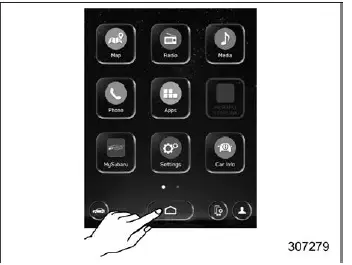
2. Touch
 (HOME).
3.

 (Settings).
4.
 "General".
5.
 "Clock".
6.
 "Time Setting".
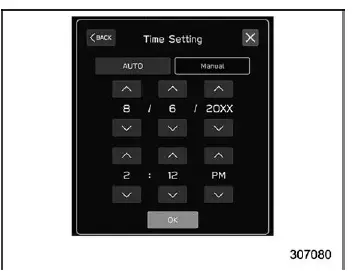
7.
 "Manual".
8.

 or
or
 .
.
9.
 "OK".
"OK".
NOTE
The clock settings screen in the Subaru Ascent can also be accessed quickly by touching the clock area on the status bar.
Setting the clock automatically
1. Turn the ignition switch to the "ON" position.
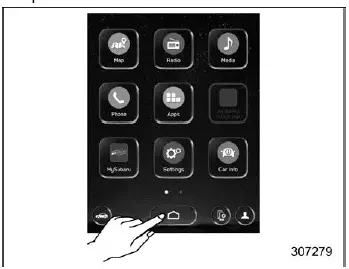
2. Touch
 (HOME).
3.

 (Settings).
4.
 "General".
5.
 "Clock".
6.
 "Time Setting".
7. Models with navigation system:
 "AUTO"
Models with SUBARU STARLINK Safety and Security without navigation system:
 "AUTO"
Models without SUBARU STARLINK Safety and Security or navigation system:
 "Sync With Phone"
Models with navigation system
The Subaru Ascent clock is automatically synchronized using GPS signals when available.
Models with SUBARU STARLINK Safety and Security without navigation system
The system automatically adjusts the time based on the vehicle’s cellular connection via the Data Communication Module (DCM).
Models without SUBARU STARLINK Safety and Security or navigation system
The Subaru Ascent clock is automatically updated when a compatible smartphone is connected via Bluetooth and phonebook data is synchronized.
1. Pair your smartphone with the audio system.
2. Transfer phonebook data to the system.
After these steps, the clock will be automatically updated.
NOTE
Depending on the smartphone model, additional settings may be required to enable automatic time synchronization.
(For example, enabling notification permissions on iOS or other platforms.) Refer to your smartphone instructions for details.
Time Zone (models with navigation system)
The "Time Zone" parameter in the Subaru Ascent can be configured within the clock settings menu.
When "AUTO" mode is selected and a GPS signal is available, the time zone is adjusted automatically.
Refer to the "Main screen" section for navigation to this setting.
Daylight Saving Time (models with navigation system)
The Daylight Saving Time setting can also be configured within the clock menu of the Subaru Ascent.
When "AUTO" mode is enabled and GPS signal is present, the system will automatically adjust for daylight saving time.
NOTE
- When "Time Setting" is set to "AUTO", both "Daylight Saving Time" and "Time Zone" can still be manually adjusted.
- If "Daylight Saving Time" is set to "AUTO", the "Time Zone" option will also be limited to automatic configuration.
The Subaru Ascent system is designed to intelligently manage vehicle information and time synchronization, ensuring accuracy, convenience, and minimal driver intervention in everyday use.
Related manual topics
Operation during cold weather
Maintenance
When operating your Subaru Ascent in winter conditions, proper preparation is
essential for safety and reliability. It is highly recommended to carry emergency
supplies such as an ice scraper, sand for traction, warning flares, a compact shovel,
and jumper cables to handle unexpec ...
USB power supply
CAUTION
In the Subaru Ascent, only USB Type-A and Type-C terminals are supported.
Connecting devices with incompatible connectors may result in charging failure
or device malfunction.
There is always a possibility of device malfunction or data loss when
using USB connections. Any conn ...