

When handing over your Subaru Ascent to a valet service, such as at a hotel, restaurant, or parking facility, you can activate Valet Mode to restrict access to sensitive vehicle systems. This feature temporarily disables navigation, audio controls, and vehicle settings, ensuring that personal data and preferences stored in the Subaru Ascent remain protected.
By limiting access to key functions, Valet Mode in the Subaru Ascent acts as an additional layer of privacy and security, preventing unauthorized interaction with the infotainment system and safeguarding personal information.
Activation of Valet Mode
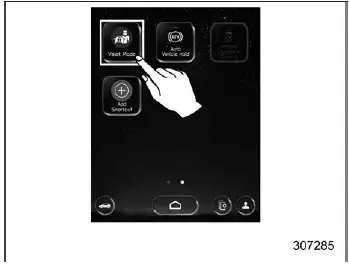
1. Touch "Valet Mode" on the Subaru Ascent display.
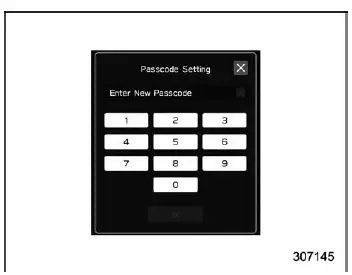
2. Enter your secure passcode.
3. Touch "OK" to confirm activation.
Deactivation of Valet Mode
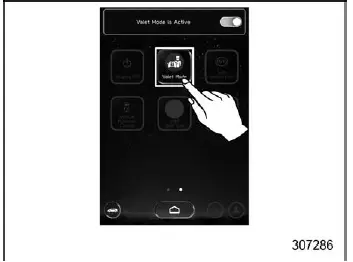
1. Touch "Valet Mode" again or switch it to OFF

2. Enter the previously set passcode.
3. Touch "OK" to restore full system access.
NOTE
If an incorrect passcode is entered three consecutive times while activating or deactivating Valet Mode in the Subaru Ascent, a notification advising you to contact a SUBARU dealer will appear. However, you can still attempt to enter the correct passcode afterward.
If the passcode is forgotten, it is recommended to contact an authorized SUBARU dealer for assistance.
Related manual topics
Continuously variable transmission features
The continuously variable transmission (CVT) in the Subaru Ascent is an advanced
electronically managed system designed to deliver seamless acceleration, optimal
efficiency, and smooth driving dynamics. Unlike traditional gearboxes, it offers
an infinite range of forward gear ratios along with ...
Power outlets
CAUTION
In the Subaru Ascent, never insert foreign objects into the accessory
power outlet, especially conductive materials such as coins or aluminum foil.
This can result in a short circuit or electrical damage. Always keep the outlet
covered with its cap when not in use.
If the plug ...